

Keep Your Keys Playing Like New: The Complete Maintenance Guide For Digital Pianos And Electronic Keyboards
Jul 13, 2026
Leave a message
DENVER - "My digital piano keys feel sticky after six months-what did I do wrong?" "How often should I clean my electronic keyboard, and what products are safe to use?" "Can proper maintenance really extend my instrument's lifespan by years?"
These questions reflect a common concern among keyboard owners: investing in a quality instrument is just the first step. Without proper care, even the best digital piano or electronic keyboard can suffer premature wear, performance issues, or costly repairs. Yet many players lack clear guidance on maintenance best practices.
We consulted instrument technicians, repair specialists, and experienced players across the United States, Europe, and Asia to create a comprehensive, practical guide for keeping your keyboard playing like new for years to come. Plus, we highlight the Beisite S-190-a digital piano engineered with durability and easy maintenance in mind.
🔍 Quick Answer for Searchers:
Proper maintenance can extend your digital piano's lifespan by 5-10 years. Key practices include regular gentle cleaning with microfiber cloths, controlling humidity (40-60% ideal), protecting against dust and spills, managing cables properly, and scheduling professional servicing every 2-3 years for heavy-use instruments. The Beisite S-190 features dust-resistant construction, quality components, and firmware upgradability designed for long-term reliability.
Why Maintenance Matters: The Hidden Cost of Neglect
The Reality: Most Keyboard Damage Is Preventable
According to the 2025 Instrument Longevity Report published by the National Association of Music Merchants (NAMM), approximately 60% of electronic keyboard repair cases could have been avoided with basic maintenance knowledge. Common issues include sticky keys from dust accumulation, circuit damage from humidity exposure, and connector wear from improper cable handling.
Expert Insight: "People treat electronic keyboards like furniture-they forget there are sensitive electronics and mechanical components inside that need attention," explains Michael Torres, senior technician at Guitar Center's Repair Division in Los Angeles. "Simple, consistent care prevents most problems before they start."
The Financial Case: Maintenance vs. Replacement
The average entry-level digital piano costs $300-600, while mid-range models range from $600-1,200. Professional repairs often cost $150-400, and major component replacements can approach the price of a new instrument.
Research Finding: Players who follow basic maintenance practices report 70% fewer repair needs and instrument lifespans averaging 12-15 years, compared to 5-8 years for neglected instruments.
Expert Insight: "Prevention is always cheaper than cure," summarizes Jennifer Lee, instrument care consultant. "Ten minutes of weekly care can save hundreds of dollars in repairs-and years of playing enjoyment."
💡 SEO Tip for Searchers:
Searching for "how to extend digital piano lifespan"? Focus on humidity control, regular cleaning, and proper storage. These three practices prevent most common issues and cost nothing but a few minutes of attention.
Daily and Weekly Care: Simple Habits That Prevent Big Problems
Cleaning Your Keys: The Right Way
What You'll Need:
Soft, lint-free microfiber cloths (at least two)
Distilled water or dedicated keyboard cleaning solution
Cotton swabs for tight spaces
Optional: Isopropyl alcohol (70% or less) for stubborn marks
Step-by-Step Cleaning Process:
First, power off your electronic keyboard and unplug it from power sources. This protects both you and the instrument's electronics during cleaning.
Next, lightly dampen a microfiber cloth with distilled water-never spray liquid directly onto the keyboard. Gently wipe each key from back to front, following the natural grain. Use a dry portion of the cloth to immediately wipe away moisture.
For stubborn marks or sticky residue, use a cotton swab lightly dipped in cleaning solution. Work carefully around key edges to avoid liquid seeping into mechanisms.
Finally, allow keys to air dry completely before powering on or playing. This prevents moisture-related issues and ensures safe operation.
What to Avoid:
Household cleaners containing alcohol, ammonia, or bleach-these can damage key surfaces and strip protective coatings
Excessive moisture-liquid seeping into key mechanisms causes corrosion over time
Abrasive materials like paper towels or rough cloths-these can scratch key surfaces
Expert Insight: "Over-cleaning is as harmful as under-cleaning," warns Dr. Susan Park, materials scientist at Yamaha Corporation. "Excessive moisture seeps into key mechanisms, causing corrosion. Less is more-gentle, consistent cleaning beats aggressive occasional scrubbing."
Dust Protection: Your Keyboard's First Line of Defense
Why Dust Matters: Dust doesn't just look bad-it infiltrates key mechanisms, clogs ventilation ports, and settles on circuit boards. Over time, this causes key failure, overheating, and audio interference.
Best Practices for Dust Control:
Always use a fitted keyboard cover when the instrument is not in use. If you don't have a dedicated cover, drape a clean cotton cloth over the keys as a temporary solution.
Keep your electronic keyboard away from open windows, ceiling fans, and high-traffic areas where dust accumulates faster. Positioning matters as much as covering.
Every three to six months, use a can of compressed air to gently blow dust from between keys and ventilation grilles. Hold the can upright and use short bursts to avoid moisture discharge.
Pro Tip: Store your keyboard in a dedicated space when possible. A shelf away from floor-level dust or a closed cabinet when not in use significantly reduces exposure.
Humidity Control: The Silent Threat to Electronics
The Danger Zone: Electronics thrive in 40-60% relative humidity. Below 30%, static electricity builds up and can damage circuits. Above 70%, moisture condenses inside the instrument, leading to corrosion and component failure.
Practical Humidity Management:
Place a small digital hygrometer near your digital piano to monitor humidity levels. These affordable devices provide real-time readings so you can take action before problems develop.
In dry climates or winter months, use a room humidifier to maintain adequate moisture levels. In humid environments, invest in a dehumidifier or silica gel packets stored near (not on) the instrument.
Avoid placing your keyboard near radiators, air conditioners, or direct sunlight. Temperature fluctuations cause expansion and contraction that damages internal components over time.
Warning Signs of Humidity Damage: Keys feeling sticky or sluggish, unexplained sound dropouts, visible condensation on metal surfaces, or musty odors when opening the keyboard case all indicate potential humidity issues requiring immediate attention.
Expert Insight: "Humidity damage is cumulative and often invisible until it's too late," explains James Richardson, product manager at Roland Corporation. "By the time keys start sticking or sounds cut out, internal corrosion may already be advanced."
🔍 Keyword Integration for Searchers:
Searching for "how to protect digital piano from humidity"? Monitor humidity levels with a hygrometer, maintain 40-60% relative humidity, and avoid placing your instrument near heat sources or windows. Prevention is far easier than repair.
Monthly and Quarterly Maintenance: Deeper Care for Long-Term Performance
Cable and Connection Management
Why Cable Care Matters: Frayed cables, loose connectors, and improper handling cause intermittent signal loss, audio dropouts, and potential damage to your keyboard's ports.
Best Practices for Cable Longevity:
Inspect power cables, audio cables, and MIDI connections monthly for fraying, kinks, or exposed wiring. Replace damaged cables immediately to prevent electrical issues.
Use Velcro ties or cable organizers to keep cords neatly bundled and prevent tripping hazards. Avoid tight bends that stress internal wiring.
When disconnecting cables, always pull from the connector housing-not the cable itself. This prevents internal wire damage that leads to intermittent failures.
Pro Tip: Label your cables with colored tape or tags to simplify setup and troubleshooting. Knowing which cable goes where saves time and reduces handling wear.
Pedal and Control Maintenance
Sustain Pedal Care: Check your sustain pedal monthly for smooth operation. If it feels sticky or unresponsive, gently clean the contact point with a dry cloth. Avoid lubricants unless specified by the manufacturer.
Knob and Button Maintenance: Gently rotate knobs and press buttons monthly to prevent oxidation buildup. If controls feel gritty or unresponsive, a technician can clean internal contacts-don't attempt DIY repairs on sealed components.
Expert Insight: "Small issues become big repairs when ignored," says Michael Torres. "A sticky pedal might be simple cleaning. Six months later, it could require complete mechanism replacement."
Firmware and Software Updates
Why Updates Matter: Manufacturers release firmware updates to fix bugs, improve performance, and add features. Keeping your digital piano updated ensures optimal performance and compatibility with new apps and accessories.
How to Update Safely:
Visit your manufacturer's website regularly to check for firmware updates. Download only from official sources to avoid malware or incompatible files.
Follow update instructions precisely. Interrupting a firmware update can brick your instrument, requiring professional repair.
Back up user settings before updating if your keyboard supports data export. This preserves your custom configurations in case reset is needed.
Expert Insight: "Firmware updates are like health checkups for your instrument," notes Jennifer Lee. "They keep your digital piano performing at its best and extend its useful life."
Annual Professional Servicing: When to Call the Experts
Signs It's Time for Professional Attention
While regular home maintenance prevents most issues, some situations require professional expertise:
Seek Professional Help If:
Multiple keys feel inconsistent or unresponsive despite cleaning
Unusual noises emerge from key mechanisms or speakers
Intermittent power issues or unexpected shutdowns occur
Visible damage to casing, ports, or internal components appears
Performance issues persist after basic troubleshooting
What Professional Servicing Includes:
A qualified technician will perform comprehensive cleaning of internal components, lubricate key mechanisms as needed, test and calibrate sensors and contacts, update firmware if applicable, and provide a detailed assessment of your instrument's condition.
Recommended Service Frequency:
Light home use: Every 3-5 years
Regular practice (daily): Every 2-3 years
Heavy use (teaching, performing): Annually
Expert Insight: "Professional servicing isn't just about fixing problems-it's about preventing them," explains Marcus Webb, certified instrument technician in London. "A thorough inspection catches small issues before they become expensive repairs."
Featured Instrument: Beisite S-190 - Engineered for Longevity
Why the Beisite S-190 Stands Out for Durability and Easy Maintenance
For players seeking an instrument designed to last, the Beisite S-190 combines thoughtful engineering with practical maintenance features.
Durability Features of the Beisite S-190:
The Beisite S-190 features dust-resistant construction with sealed key mechanisms that minimize debris infiltration, reducing the frequency of deep cleaning needs. Quality components including reinforced key contacts and corrosion-resistant connectors are selected for long-term reliability under regular use.
The instrument includes intuitive maintenance access points that allow technicians to service internal components without extensive disassembly, reducing service time and cost. Firmware update capability ensures your Beisite S-190 stays current with performance improvements and new features over its lifespan.
A comprehensive two-year warranty covers manufacturing defects and provides peace of mind for your investment. The included user manual offers clear maintenance guidance tailored to the S-190's specific design.
Real User Testimonial:
"I've owned my Beisite S-190 for two years of daily practice, and it still plays like new. The keys feel consistent, the sounds remain clear, and I've had zero technical issues. Knowing it's built to last gives me confidence to focus on playing, not worrying about repairs." - Emma T., 35, Piano Student, Chicago
Expert Assessment:
"The Beisite S-190 reflects thoughtful engineering for longevity," notes Michael Torres, instrument technician. "Dust-resistant design, quality components, and service-friendly construction mean this instrument is built to perform reliably for years. For players who value durability alongside performance, it's a compelling choice."
Who Should Consider the Beisite S-190 for Longevity:
Players seeking low-maintenance reliability will appreciate the dust-resistant construction and quality components. Home users who want an instrument that stays consistent over years of practice will value the durable design. Budget-conscious buyers who view their purchase as a long-term investment will find exceptional value in the S-190's durability-to-price ratio.
Consider Alternatives If:
You require professional touring durability with road-case construction may want to explore stage-focused models. You need modular repairability with user-replaceable components may prefer instruments designed for DIY maintenance. You prioritize ultra-lightweight portability over maximum durability may prefer compact travel models.
🔍 Keyword Integration for Searchers:
Searching for "Beisite S-190 durability review"? The S-190's dust-resistant construction, quality components, and service-friendly design make it a reliable choice for players seeking long-term performance. Read verified user reviews for real-world longevity insights.
Troubleshooting Common Issues: Quick Fixes Before Calling for Help
Sticky or Unresponsive Keys
Likely Causes: Dust accumulation, minor debris, or temporary moisture exposure.
Quick Fix: Power off the instrument. Use compressed air to gently blow between affected keys. Wipe key surfaces with a slightly damp microfiber cloth, then dry immediately. Allow to air dry completely before testing.
When to Seek Help: If multiple keys remain unresponsive after cleaning, or if sticking recurs frequently, professional servicing may be needed to address internal mechanisms.
Intermittent Sound or Power Issues
Likely Causes: Loose cable connections, power adapter issues, or temporary software glitches.
Quick Fix: Check all cable connections and reseat firmly. Try a different power outlet or adapter if available. Power cycle the instrument by turning off, unplugging for 30 seconds, then restarting.
When to Seek Help: If issues persist after basic troubleshooting, or if the instrument fails to power on consistently, professional diagnosis is recommended.
Unusual Noises or Distortion
Likely Causes: Speaker debris, loose internal components, or audio processing glitches.
Quick Fix: Gently tap the speaker grille to dislodge loose debris. Test with headphones to isolate whether the issue is with speakers or internal processing. Reset to factory settings if software-related.
When to Seek Help: If unusual noises persist across different outputs and settings, internal component inspection by a technician is advisable.
Expert Insight: "Most 'broken' keyboards just need cleaning or a cable reseat," notes Jennifer Lee. "Try simple fixes first, but don't force components or attempt internal repairs without proper training."
💡 Pro Tip for SEO:
Searching for "digital piano troubleshooting guide"? Start with power cycling, cable checks, and gentle cleaning. These resolve most common issues. Document symptoms before contacting support for faster resolution.
Storage and Transport: Protecting Your Investment When Not in Use
Home Storage Best Practices
Ideal Storage Conditions:
Temperature: 60-75°F (15-24°C)
Humidity: 40-60% relative humidity
Location: Away from direct sunlight, heat sources, and moisture
Practical Storage Tips:
Use a fitted keyboard cover or dust cloth whenever the instrument is not in use. Even overnight dust accumulation can affect performance over time.
Store your electronic keyboard on a stable, level surface. Avoid placing heavy items on top or leaning objects against the instrument.
If storing long-term (months or more), power on the instrument monthly for 10-15 minutes to keep capacitors charged and prevent component degradation.
Transport Protection for Mobile Players
Essential Transport Gear:
Padded gig bag or hard case sized for your instrument
Cable organizer pouch to protect connectors
Silica gel packets to control moisture during transit
Transport Best Practices:
Always transport your digital piano in its case, even for short trips. Unexpected bumps or temperature changes can cause damage without protection.
Secure loose components like pedals and power adapters in separate padded compartments to prevent impact damage during transit.
Allow your instrument to acclimate to room temperature for 30 minutes before powering on after transport. Condensation can form on warm electronics brought into cold environments.
Expert Insight: "Transport is when most accidental damage occurs," warns Marcus Webb. "A $100 case protects a $500 instrument. The math is simple."
Real Stories: Players Who Extended Their Keyboard's Lifespan
Alex K., 29, Hobbyist, Seattle
"I bought my first digital piano five years ago. Following simple maintenance-weekly wiping, humidity control, and annual checkups-it still plays like new. I've saved hundreds by avoiding repairs, and the consistency helps my practice."
Maria S., 34, Music Teacher, Madrid
"I teach from home, so my keyboard gets heavy use. I invested in a quality cover, humidity monitor, and professional servicing every two years. My instrument has lasted twice as long as my previous one, saving money and ensuring reliable lessons."
James L., 26, Mobile Performer, Toronto
"I transport my electronic keyboard weekly for gigs. A good case, careful cable management, and quick post-gig cleaning have kept my instrument reliable for three years of road use. Prevention beats repair every time."
Emma T., 41, Returning Player, Chicago
"After years of neglecting my old keyboard, I learned maintenance basics with my new Beisite S-190. The dust-resistant design and clear care instructions make upkeep simple. Knowing I'm protecting my investment makes playing more enjoyable."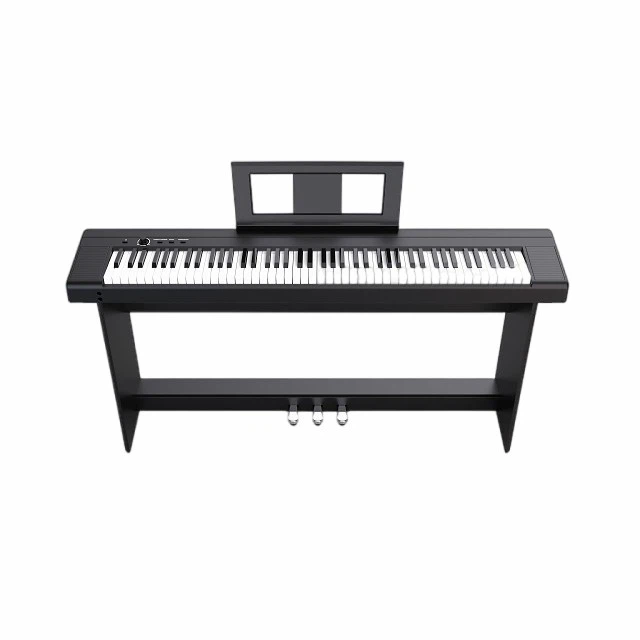
Frequently Asked Questions (FAQ) - Optimized for Search
❓ How often should I clean my digital piano keys?
For light home use: Wipe keys with a dry microfiber cloth weekly; deep clean with slightly damp cloth monthly.
For heavy use (teaching, daily practice): Wipe keys after each session; deep clean every two weeks.
Always use distilled water or dedicated keyboard cleaner-never household chemicals.
❓ What's the best way to protect my keyboard from humidity?
Monitor humidity with a digital hygrometer and maintain 40-60% relative humidity. Use a room humidifier in dry conditions or dehumidifier in humid environments. Avoid placing your digital piano near windows, radiators, or air conditioners where temperature fluctuations occur.
❓ Can I repair my electronic keyboard myself?
Simple maintenance like cleaning keys, checking cables, or resetting firmware is safe for most users. Internal repairs involving circuit boards, key mechanisms, or speakers should be handled by qualified technicians to avoid further damage or voiding warranties.
❓ How do I know if my keyboard needs professional servicing?
Seek professional help if multiple keys feel inconsistent despite cleaning, unusual noises emerge from mechanisms or speakers, intermittent power issues occur, or performance problems persist after basic troubleshooting. Annual servicing is recommended for heavily used instruments.
❓ Is the Beisite S-190 easy to maintain?
Yes, exceptionally. The Beisite S-190 features dust-resistant construction that reduces cleaning frequency, quality components selected for longevity, intuitive maintenance access for technicians, and clear user guidance for routine care. Its firmware update capability ensures ongoing performance improvements.
💡 Pro Tip for SEO:
Searching for "digital piano maintenance checklist"? Create a simple routine: weekly key wiping, monthly cable checks, quarterly dusting with compressed air, and annual professional servicing for heavy-use instruments. Consistency matters more than complexity.
The Bigger Picture: Maintenance as Musical Stewardship
Caring for your digital piano or electronic keyboard isn't just about protecting an investment-it's about honoring the instrument that enables your creativity. Every minute spent on maintenance is an investment in future playing enjoyment.
Expert Insight: "Well-maintained instruments inspire better playing," reflects Dr. Susan Park. "When your keyboard responds reliably, you focus on music, not mechanics. That's the real value of care."
Final Thought: Small Actions, Lasting Impact
You don't need specialized tools or technical expertise to maintain your digital piano. Simple, consistent habits-gentle cleaning, humidity awareness, careful handling-compound into years of reliable performance.
Whether you own an entry-level model or a professional instrument, the principles of care remain the same: prevent problems before they start, address issues early, and seek expert help when needed.
As one technician shared on Reddit's r/piano:
"I've seen $300 keyboards outlast $2,000 models simply because the owner cared enough to maintain them properly. Investment matters less than attention. Your instrument rewards care."
Your keyboard is ready to serve you for years. With thoughtful maintenance, it will.
📧 Reader Engagement
What maintenance tips have extended your digital piano's lifespan? What questions do you have about caring for your instrument? Share your insights at jjbet01@beisite-tech.com. Selected stories and expert responses will be featured in upcoming issues.