

Unlock Your Sound Palette: A Quick Guide To Digital Piano Sound Design
Jul 27, 2026
Leave a message
Los Angeles - "I only use the piano sound on my digital piano-am I missing out on a lot?" "How do I layer sounds or add effects on a digital keyboard?"
You're not alone. Modern keyboards offer a wealth of creative tools, but many players still stick to preset sounds. This quick-start guide will help you unlock unique sounds and explain why the Beisite S-190 makes exploration a breeze.
Yes, you can customize sounds on any digital piano or electronic keyboard. Start by layering sounds, add subtle effects, and record your discoveries. With over 600 sounds, intuitive controls, and built-in recording capabilities, the Beisite S-190 makes all of this simple and affordable.
3 Essential Tips for Customizing Sounds
1. Sound Layering: Instantly Enhance Sound Richness
Feature Overview: Combine two sounds (e.g., piano + strings) to achieve a fuller sound texture without complex playing techniques.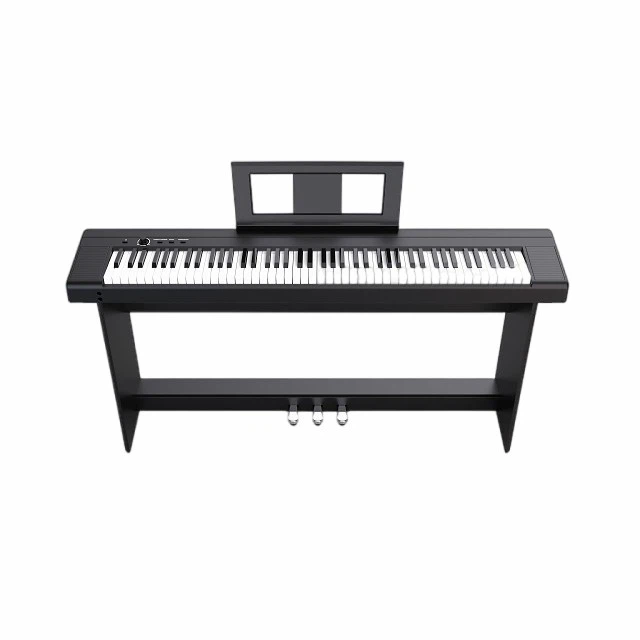
How to Do It:
Select a main sound (e.g., grand piano)
Add a secondary sound layer (e.g., soft strings or a gentle synth sound)
Balance the volume: Set the main sound to 70% and the secondary sound to 30% for clarity
Pro Tip: Start with simple combinations. A bright piano paired with warm strings can create depth; an electric piano combined with a soft chorus effect can add dynamism.
Beisite S-190
2. Effects Processing: Adding Spatial Depth and Character
Key Effects to Explore:
Reverb: Adds atmosphere-short reverb creates intimacy, while long reverb adds drama
Chorus: Adds body to the sound-ideal for electric pianos or strings
Delay: Creates rhythmic echoes-perfect for upbeat sections
How to Apply: Start with a subtle reverb. Even a small amount of reverb can transform a simple phrase; overuse can make the sound muddy.
Expert Insight: "Effects are seasoning, not the main ingredient," notes sound designer David Chen. "Use them to enhance emotion, not to mask technique."
3. Dynamic Shaping: Playing with Expression
Take advantage of the keyboard's touch sensitivity to change the tone through variations in playing dynamics:
Play softly to create delicate, gentle passages
Press down firmly to create a heart-pounding climax
Practice dynamic control and explore how your touch affects the tone
Extra Tip: If your digital piano has modulation control, try using subtle vibrato or filter sweeps to add expressiveness.
SEO Tip:
Searching for "how to layer piano sounds"? Start with two complementary sounds, balance their volumes, then record and listen to the result. The digital piano's intuitive and user-friendly interface lets you instantly experience a wide range of sound variations.
Featured Recommendation: Beisite S-190 - Built for Sound Exploration
Why It Stands Out in Sound Design
The Beisite S-190 offers professional-grade sound customization without any complexity:
Over 600 high-quality...
Offers professional-grade sound customization without the complexity:
Over 600 high-quality sounds: From concert grand pianos to atmospheric synth sounds, the creative possibilities are endless
Intuitive sound layering controls: Instantly combine various sounds without navigating through complicated menus
Comprehensive effects: Reverb, chorus, delay, and equalizer, all with adjustable parameters
Built-in recording: Capture musical inspiration on the spot for easy review or sharing
Responsive weighted keys: Subtle dynamic response that brings expressiveness to your playing
User Reviews:
"The Beisite S-190's sound library and convenient sound layering feature let me create unique sounds in seconds. Recording my experimental work helps me refine my style. It makes creating music so easy." - Alex K., Producer, Portland
Ideal for: Beginners exploring sound, intermediate players looking to expand their sound library, and music creators seeking a reliable home production tool.
Searching for "Beisite S-190 sound features"? With over 600 sounds, intuitive sound layering, effects processing, and recording capabilities-all at an affordable price-it's the perfect choice for exploring sound.
Quick Q&A: Sound Design Essentials
Do I need advanced skills to customize sounds?
No. Start with simple sound layering or a single effect. Your ears will guide you-curiosity matters more than expertise.
How much time should I spend exploring?
Just 5–10 minutes at a time is enough. Consistent, small-scale exploration will boost your creativity over time.
Can I use these techniques on any keyboard?
Yes, but the features matter. An instrument like the Beisite S-190-with its rich sound library, intuitive controls, and recording capabilities-can accelerate your creative discoveries.
Beisite S-190 Is it suitable for exploring sounds?
Yes. With over 600 sounds, intuitive sound layering, a wide range of effects, and recording capabilities, it helps you grow as a creator at an affordable price.
Looking for the "best keyboard for sound design"? Prioritize sound variety, intuitive controls, and recording capabilities. The Beisite S-190 perfectly meets these essential needs.
Conclusion: Your Sound, Your Voice
Exploring sound doesn't require perfect technique or expensive equipment. What you need is curiosity and a passion for playing.
Your digital piano or electronic keyboard is an invitation-an invitation to layer sounds, add effects, and express yourself. Start small. Listen closely. Create freely.
As one musician shared:
"I used to stick to just piano sounds. Exploring the Beisite S-190's tones and effects has opened up a whole new world of creativity for me. Now, every performance feels like a journey of discovery."
Your musical journey begins now.