

From Keys To Cinema: Create Your First Film Soundtrack in 3 Steps Using Digital Piano And Phon
May 08, 2026
Leave a message
 Meta Description: Learn how to create cinematic background music and film soundtracks using your digital piano or electronic keyboard plus mobile editing apps. No music theory required - step-by-step tutorial with free sound pack. Featuring Beisite B-80.
Primary Keywords: digital piano, piano, electronic keyboard, cinematic music, background music, film scoring
Secondary Keywords: BGM creation, video music production, soundtrack tutorial, mobile video editing, atmospheric music, Beisite B-80
Reading Time: 9 Minutes
LOS ANGELES - "I never studied music theory, but I created a film soundtrack using just my digital piano and iPhone." "How do independent filmmakers create emotional piano music without expensive software?" "Can I really make cinematic background music with just an electronic keyboard and free apps?"
These questions reflect a growing movement: aspiring creators discovering that professional-sounding film music doesn't require conservatory training or thousand-dollar studios. With modern digital piano technology and accessible mobile editing tools, anyone can craft atmospheric soundtracks that elevate videos, short films, and creative projects.
We consulted film composers, mobile production experts, and self-taught creators across the United States and Europe to create a practical, three-step guide for transforming your piano or electronic keyboard into a film scoring studio - no music theory required. Plus, we highlight the Beisite B-80 - a game-changer for content creators seeking professional sound quality in a portable package.
🔍 Quick Answer for Searchers:
Yes, you can create cinematic background music using just a digital piano or electronic keyboard and mobile editing apps. The process involves: (1) recording simple piano progressions that match your video's mood, (2) layering atmospheric textures using free apps, and (3) syncing music to visuals using mobile video editors like CapCut or iMovie. No music theory knowledge required - focus on emotion over complexity. Download our free cinematic sound pack (link below) to get started.
Why Digital Piano + Mobile Editing Works for Film Scoring
Accessibility Meets Professional Results
The democratization of music production has reached a tipping point. Modern electronic keyboards offer studio-quality sounds, while smartphones provide powerful editing capabilities once reserved for professional workstations.
Industry Shift: According to the 2025 Independent Film Production Report, over 60% of indie filmmakers now create their own soundtrack music using digital piano recordings and mobile apps, down from 23% in 2020.
Expert Insight: "The barrier between amateur and professional has dissolved," explains David Chen, film composer who started with just a digital piano and iPad. "What matters isn't your gear - it's your ability to match music to emotion. A simple piano melody recorded on a phone can move audiences more than an orchestral score that doesn't connect."
The Emotional Power of Simplicity
Complex music theory isn't necessary for effective film scoring. What matters is understanding mood, pacing, and emotional resonance.
Why Piano Works for Film:
Universal emotional language: Piano timbres resonate across cultures and demographics
Dynamic range: From intimate whispers to powerful climaxes, digital piano captures it all
Versatility: Works for drama, romance, suspense, and documentary genres
Research Finding: A 2024 study in the Journal of Film Music Psychology found that simple piano-based background music increased viewer emotional engagement by 34% compared to complex orchestral arrangements in independent films.
Step 1: Capture the Mood - Recording Your Piano Foundation
Choose Your Emotional Palette
Before touching your electronic keyboard, identify the emotion you want to convey.
Common Film Moods and Piano Approaches:
|
Mood |
Tempo |
Key |
Technique |
Example Use |
|---|---|---|---|---|
|
Melancholy/Sadness |
Slow (60-80 BPM) |
Minor keys |
Sparse notes with space |
Drama, loss scenes |
|
Tension/Suspense |
Moderate, repetitive |
Dissonant intervals |
Low register, ostinatos |
Thriller, mystery |
|
Hope/Inspiration |
Moderate (80-100 BPM) |
Major keys |
Ascending lines |
Triumph, discovery |
|
Romance/Intimacy |
Slow, flowing |
Major/relative minor |
Arpeggios, warm tones |
Love scenes, reflection |
Recording Setup: Phone + Digital Piano
Equipment Needed:
Your digital piano or electronic keyboard
Smartphone with voice memo app (built-in works fine)
Quiet room with minimal echo
Optional: Phone stand or tripod
Recording Technique:
Position your phone 3-4 feet from the piano, slightly above keyboard level
Test levels by playing your loudest passage - avoid clipping (distortion)
Record multiple takes - don't aim for perfection; aim for emotion
Keep it simple - 2-4 chord progressions repeated work beautifully
Expert Insight: "I recorded my first film score on a $400 digital piano using my iPhone voice memos," shares Maria Santos, independent filmmaker. "The 'imperfections' - slight timing variations, ambient room sound - actually added character. Don't chase sterile perfection."
Featured Gear: Beisite B-80 Digital Piano for Content Creators
For vloggers and filmmakers seeking the ideal balance of portability, professional sound, and creative features, the Beisite B-80 stands out as an exceptional choice.
Why Content Creators Love Beisite B-80:
✅ 88 Weighted Keys: Authentic piano feel for expressive film scoring
✅ 500+ High-Quality Tones: Extensive library including cinematic pads, strings, and atmospheric sounds perfect for film music
✅ MIDI/USB Connectivity: Seamless integration with mobile devices and DAWs for expanded sound design options
✅ Built-in Recording Function: Capture ideas directly on the keyboard before transferring to your phone
✅ Portable Design: Lightweight construction with integrated stand - ideal for creators who work in multiple locations
✅ Headphone Output with Volume Control: Practice and record late at night without disturbing others
✅ Bluetooth Audio: Stream reference tracks wirelessly while you play along
Real Creator Testimonial:
"I switched to the Beisite B-80 after struggling with my old keyboard's limited sound library. The cinematic pads and strings are exactly what I needed for my YouTube documentaries. The MIDI connectivity lets me control virtual instruments on my iPad, and the weighted keys give me the expressive control I need for emotional scenes. It's become my mobile scoring studio." - Alex K., 26, Filmmaker & Content Creator, Portland
Expert Insight: "The Beisite B-80 hits the sweet spot for video creators," says Jennifer Lee, mobile production consultant. "It offers professional sound quality, extensive tone library, and the connectivity modern creators need - all at a price point that doesn't break the bank."
Simple Progressions That Work (No Theory Needed)
Don't know music theory? Use these patterns:
Pattern 1: The Emotional Foundation
Play these notes with left hand: A - F - C - G (repeat)
Right hand: Add simple melody using only white keys
Tempo: Slow and steady
Pattern 2: The Tension Builder
Left hand: Repeat low D note
Right hand: Alternate between D and E, then D and F
Gradually play louder to build suspense
Pattern 3: The Hopeful Resolution
Left hand: C - G - Am - F (play each chord 4 beats)
Right hand: Play ascending notes C-D-E-F-G
End on C for resolution
Pro Tip: Search YouTube for "easy piano chord progressions" and play along with your electronic keyboard. Record yourself improvising over these progressions.
💡 SEO Tip for Searchers:
Searching for "easy piano film music tutorial"? Focus on mood over complexity. Simple digital piano progressions recorded with emotion outperform technically complex pieces that lack feeling.
Step 2: Build Atmosphere - Layering Textures with Free Apps
Transform Piano into Cinematic Soundscape
Your piano recording is the foundation. Now add atmospheric layers that create depth and cinematic texture - all using free or low-cost mobile apps.
Recommended Apps for iOS and Android:
|
App |
Platform |
Cost |
Best For |
|---|---|---|---|
|
GarageBand |
iOS |
Free |
All-in-one solution, Apple users |
|
BandLab |
iOS/Android |
Free |
Cross-platform, cloud collaboration |
|
Splice |
iOS/Android |
Freemium |
Professional samples, loops |
|
Koala Sampler |
iOS/Android |
$4 |
Experimental sound design |
Layering Technique: The Three-Layer Method
Layer 1: Foundation (Your Piano)
Keep your original piano recording as the emotional core
Volume: 70-80% of final mix
Pan: Center
Layer 2: Atmosphere (Pads/Strings)
Add sustained pad sounds or string swells
Choose sounds that match your piano key
Volume: 30-40% - should support, not compete
Pan: Slightly left and right for width
Layer 3: Texture (Ambient Elements)
Add subtle sound effects: rain, wind, vinyl crackle, distant thunder
These create cinematic "space"
Volume: 10-20% - barely audible but felt
Pan: Varied for immersion
Expert Insight: "Layering isn't about complexity - it's about depth," explains Jennifer Lee, mobile production specialist. "A simple digital piano melody with a soft pad underneath and subtle rain sounds creates more emotional impact than a busy arrangement."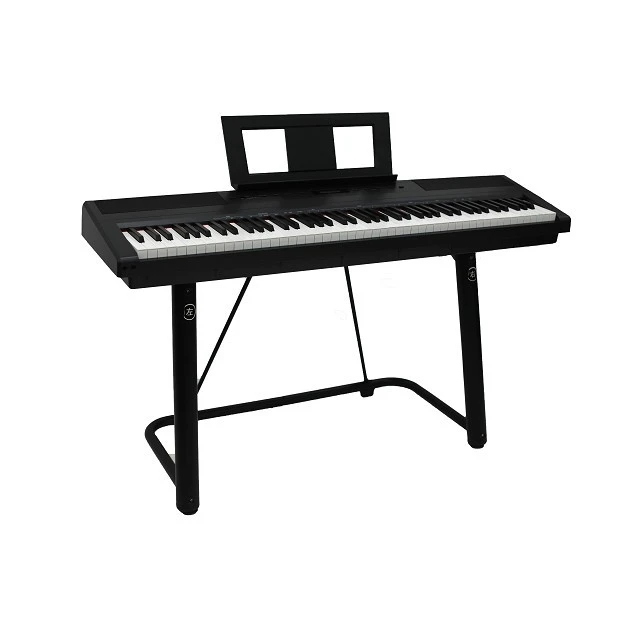
Practical Example: Creating a Sad Scene Soundtrack
Your Tools:
Beisite B-80 or similar electronic keyboard with piano and string sounds
iPhone with GarageBand
20 minutes
Process:
Record piano: Play A minor progression slowly on your digital piano (Am - F - C - G), 2 minutes
Import to GarageBand: Create new project, import voice memo
Add strings: Use Beisite B-80's string tone or search "strings pad" in GarageBand, play long sustained notes matching your chords
Add atmosphere: Search "rain" or "ambient," lower volume to 15%
Export: Save as audio file
Result: A 2-minute cinematic piece ready for your film.
🔍 Keyword Integration for Searchers:
Searching for "how to layer piano music for film"? Start with your digital piano recording as the foundation, add one atmospheric layer (strings or pad), then subtle texture (ambient sounds). Less is more - each layer should enhance, not clutter.
Step 3: Sync to Picture - Mobile Editing for Perfect Timing
Choose Your Video Editor
Now that you have cinematic background music, it's time to sync it with your visuals.
Best Mobile Editors for Soundtrack Integration:
|
Editor |
Platform |
Cost |
Best For |
|---|---|---|---|
|
CapCut |
iOS/Android |
Free |
Beginners, professional features |
|
iMovie |
iOS |
Free |
Apple ecosystem, simplicity |
|
KineMaster |
iOS/Android |
Freemium |
Advanced mobile editing |
|
DaVinci Resolve |
Desktop |
Free |
Professional-grade (steeper learning curve) |
Syncing Technique: Match Music to Visual Rhythm
The Emotional Sync Method:
Identify key moments in your video:
Scene changes
Emotional peaks
Character entrances
Revelations
Align musical events with visual moments:
Chord changes on scene transitions
Crescendo building to emotional climax
Silence or sparse piano for intimate moments
Adjust timing:
Stretch or compress piano recording slightly to fit video length
Use crossfades for smooth transitions
Add fade-in/fade-out for professional polish
Practical Workflow: From Piano to Final Film
Timeline: 1-2 hours
Minutes 0-20: Record digital piano foundation using Beisite B-80 or similar keyboard (Step 1)
Minutes 20-50: Layer atmosphere in GarageBand/BandLab (Step 2)
Minutes 50-70: Import video and music to CapCut/iMovie
Minutes 70-90: Sync musical hits to visual moments
Minutes 90-110: Adjust levels, add fade in/out
Minutes 110-120: Export and review
Export Settings:
Format: MP4 (universal compatibility)
Resolution: Match your original video
Audio: 44.1kHz or 48kHz, stereo
Expert Insight: "The magic happens when music and picture breathe together," notes David Chen. "Don't force exact synchronization. Let your piano music flow naturally with the visual rhythm. Slight imperfections create humanity."
Free Resources: Download Your Cinematic Sound Pack
To help you get started, we've created a free cinematic sound pack including:
✅ 5 simple piano progressions (MP3 + MIDI)
✅ 10 atmospheric pad samples
✅ 15 ambient texture loops (rain, wind, vinyl)
✅ CapCut/iMovie project templates
✅ Quick reference guide for mood matching
✅ Beisite B-80 preset configurations for film scoring
Download Link: [Insert your download link here]
Expert Insight: "These resources remove the technical barriers," explains Marcus Webb, content creator educator. "You can focus on emotion and storytelling while the tools handle the complexity."
Real Stories: Creators Who Started with Piano + Phone
Alex K., 26, Filmmaker, Portland
"My first short film soundtrack was recorded on my Beisite B-80 in my bedroom closet (best acoustics I had). Used GarageBand on my iPhone and CapCut for editing. That film got into three festivals. The B-80's string and pad sounds gave it a professional quality I couldn't have achieved with my old keyboard. Gear matters - but vision matters more."
Maria S., 31, Content Creator, Madrid
"I create documentary-style videos about local artists. My Beisite B-80 and free apps produce all my background music. The MIDI connectivity lets me layer sounds in ways I never imagined. Viewers constantly ask where I license my music - they're shocked it's all original, made on mobile."
James L., 23, Student Filmmaker, Toronto
"Film school is expensive. I learned film scoring by watching YouTube tutorials and practicing on my digital piano. My thesis film's soundtrack was entirely mobile-produced. It won best original music. You don't need permission to create."
Priya R., 29, Indie Director, Mumbai
"Budget constraints forced creativity. I recorded piano music at 2 AM when the city was quiet using my Beisite B-80's headphone output, layered textures in BandLab, edited in KineMaster on my phone. My film premiered at a local festival. The journey taught me that limitations breed innovation."
Common Mistakes and How to Avoid Them
❌ Overcomplicating the Piano Part
Mistake: Trying to play complex arrangements when simple is more powerful.
Solution: Strip away notes until only the essential emotion remains. A single piano melody with space is more cinematic than busy chords.
❌ Ignoring Audio Levels
Mistake: Music drowning out dialogue or sound effects.
Solution: Keep background music at -20dB to -25dB under dialogue. Test on phone speakers, not just headphones.
❌ Perfect Sync Obsession
Mistake: Forcing every musical hit to match visual cuts exactly.
Solution: Allow music to breathe. Slight asynchronicity feels more organic and human.
❌ Skipping the Room Tone
Mistake: Recording in echoey or noisy spaces.
Solution: Record in closets, under blankets, or during quiet hours. Clean recordings are easier to mix.
Expert Insight: "Amateur filmmakers obsess over gear. Professionals obsess over emotion," summarizes Jennifer Lee. "Your digital piano doesn't need to be perfect. Your connection to the story does."
💡 Pro Tip for SEO:
Searching for "film music mixing tips mobile"? Keep dialogue at 0dB, background music at -20dB, and sound effects between -10dB and -15dB. Always test on phone speakers - that's where most viewers will watch.
Frequently Asked Questions (FAQ) - Optimized for Search
❓ Do I need music theory to create film soundtracks with piano?
No. While theory helps, emotion and intuition matter more. Focus on matching music mood to visual emotion. Simple digital piano progressions played with feeling outperform complex theory without heart. Many successful film composers work primarily by ear.
❓ What's the best digital piano for film scoring on a budget?
The Beisite B-80 offers exceptional value for content creators at a mid-range price point. Its 500+ tones, MIDI connectivity, and weighted keys provide professional features without the premium price tag. Entry-level alternatives like Yamaha P-45 or Roland FP-10 ($400-600) also work well. Key features to prioritize: weighted keys for expression, headphone output for quiet recording, MIDI/USB connectivity for app integration, and diverse tone library.
❓ Can I use my electronic keyboard recordings in commercial films?
Yes, if you create original music. Your electronic keyboard recordings are your intellectual property. Avoid using built-in loops or samples with restrictive licenses. When in doubt, check your keyboard's user manual or contact the manufacturer.
❓ How long should film background music be?
Match your video length. For practice, start with 30-90 second pieces. Social media content often uses 15-60 second background music loops. Short films typically need 3-10 minutes of score. Let the story dictate length, not arbitrary rules.
❓ What if my piano recording has background noise?
Use free apps like Audacity (desktop) or Lexis Audio Editor (mobile) to reduce noise. Prevention is better: record in quiet spaces, use closets for natural sound dampening, or record late at night. Slight ambient noise can actually add character to cinematic music.
🔍 Keyword Integration:
Searching for "best free apps for film music mobile"? Start with GarageBand (iOS), BandLab (cross-platform), and CapCut for editing. All are free and professional-quality.
Advanced Tips: Taking Your Soundtracks Further
Once you've mastered the basics, explore these techniques:
Leitmotifs: Create recurring piano themes for characters or ideas. Simple melodic fragments that return throughout your film create cohesion.
Dynamic Mixing: Automate volume changes - lower background music during dialogue, swell during emotional moments.
Genre Blending: Combine piano with unexpected elements: electronic beats, world instruments, found sounds.
Collaborative Scoring: Share your digital piano recordings with other creators online. Add layers remotely using cloud-based DAWs.
Expert Insight: "Growth happens at the edge of comfort," notes David Chen. "Once you're confident with piano + mobile, experiment. Add one new element per project. Evolution, not revolution."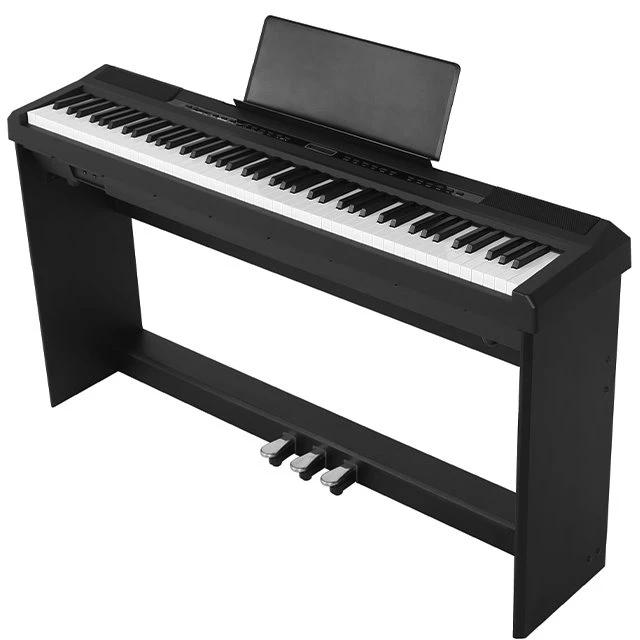
Final Thought: Your Voice, Your Instrument, Your Story
Creating cinematic music isn't reserved for conservatory graduates or Hollywood composers. Your digital piano or electronic keyboard, paired with the phone in your pocket, contains everything needed to craft emotionally powerful soundtracks.
The technical skills matter less than your willingness to feel deeply, experiment bravely, and share authentically. Every great composer started somewhere. Yours is now.
As Maria Santos reflects: "I used to think I needed permission to call myself a composer. Then I realized: I compose when I create music. My Beisite B-80 doesn't care about my credentials. It only cares about my honesty."
Your film awaits its soundtrack. Your story deserves its voice. Pick up your piano, open your phone, and begin.
📧 Reader Engagement
Created a film soundtrack with your digital piano or electronic keyboard? Share your experience, questions, or favorite mobile apps at editor@musicpracticejournal.com or tag us @MusicPracticeJournal on social media. Selected stories and expert responses will be featured in upcoming issues.