

Keyboard Accessories Decoded: What's Worth Your Money And What's A Waste
Apr 02, 2026
Leave a message
NEW YORK - "I spent two hundred dollars on a keyboard stand that collapsed during my first gig." "My cheap headphones made my keyboard sound terrible. I didn't know if it was the instrument or the headphones." "Is a five-hundred-dollar pedal really worth ten times more than the fifty-dollar version?"
These frustrations echo across online forums and music stores worldwide. Electronic keyboard owners face an overwhelming array of accessory options, from essential equipment to questionable add-ons. Marketing claims often exceed reality, leaving buyers uncertain about where to invest and where to save.
We consulted professional keyboardists, audio engineers, and product testers across the United States and Europe to separate genuinely valuable accessories from overpriced gimmicks.
The Accessory Market: Size and Confusion
According to the 2025 Keyboard Accessory Market Report published by the National Association of Music Merchants (NAMM), the global keyboard accessory market reached 2.8 billion dollars in 2025, growing at 12 percent annually. However, consumer satisfaction varies dramatically across product categories.
Among keyboard owners surveyed, 71% reported purchasing at least one accessory they later regretted. 58% said they lacked clear guidance when making accessory decisions. 43% admitted buying products based on marketing rather than actual need.
"The accessory market is fragmented and confusing," explains Michael Torres, product reviewer at Keyboard Magazine. "Manufacturers know beginners don't know what matters. Some take advantage of that. Our job is to bring clarity."
Category One: Keyboard Stands - Foundation Matters
What to Look For
Stability is the primary concern. A wobbly stand compromises playing comfort and risks equipment damage. Weight capacity should exceed your keyboard's weight by at least thirty percent. Height adjustability accommodates different playing positions.
Types Explained
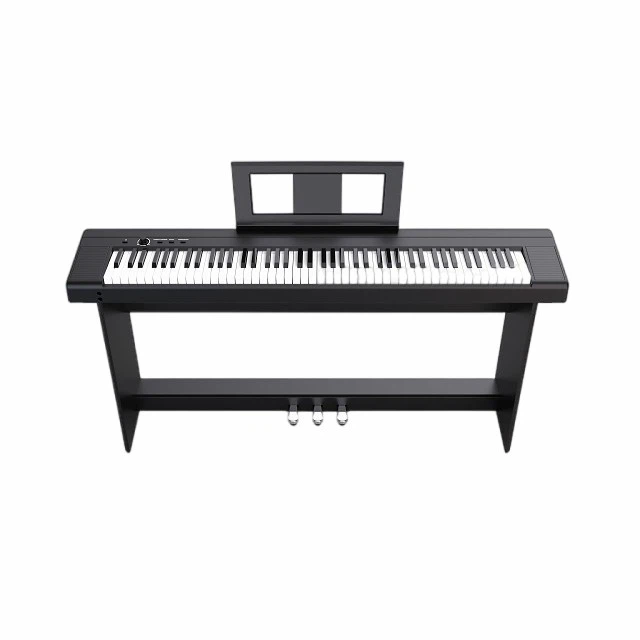
X-stands offer portability and affordability but lack stability for heavy instruments. Z-stands provide better stability and allow seating behind the keyboard. Table-style stands offer maximum stability but are less portable.
Worth the Investment
Quality stands from K&M, Ultimate Support, and Gator Frameworks range from 80 to 200 dollars. These brands offer durability, stability, and warranty support. Professional performers report stands lasting ten years or more with regular use.
Skip or Save
Ultra-budget X-stands under 40 dollars often fail within months. Thin metal tubing bends under weight. Locking mechanisms wear quickly. If budget is tight, buy used quality stands rather than new cheap ones.
Expert Insight
"I've seen keyboards fall because of cheap stands," says Jennifer Lee, touring keyboardist in Los Angeles. "A two-hundred-dollar stand protects a two-thousand-dollar instrument. The math is simple. Don't cheap out on foundation."
Recommended Products
K&M 18950 Spider Stand - 180 dollars, maximum stability
Ultimate Support JS-TR100 - 120 dollars, excellent value
Gator Frameworks Deluxe - 90 dollars, portable and sturdy
Category Two: Sustain Pedals - Feel Affects Performance
What to Look For
Pedal weight and resistance matter. Lightweight pedals slide during play and provide poor expression. Look for non-slip rubber bottoms and realistic piano-style resistance. Polarity switching accommodates different keyboard brands.
Types Explained
Basic square pedals cost 15 to 30 dollars and function adequately for beginners. Piano-style pedals with weighted bases cost 50 to 150 dollars and provide authentic feel. Continuous half-damper pedals cost 100 to 250 dollars and enable nuanced sustain control.
Worth the Investment
If you play piano repertoire seriously, piano-style pedals justify the cost. Yamaha FC3A, Roland DP-10, and Beisite B-80 offer realistic feel and durability. Professional players report significant improvement in expression.
Skip or Save
Basic square pedals work fine for beginners, organ players, and synth users who don't need sustain nuance. No need to spend 150 dollars if you rarely use sustain.
Expert Insight
"Pedal technique is part of piano playing," explains Dr. Rachel Goldman, Professor of Piano Pedagogy at Juilliard School. "A quality pedal enables proper technique development. Cheap pedals fight against you."
Recommended Products
Category Three: Headphones - Your Private Listening Portal
What to Look For
Impedance matching affects volume and sound quality. Most keyboards work best with 32 to 80 ohm headphones. Closed-back designs isolate sound for quiet practice. Comfort matters for extended sessions.
Types Explained
Consumer headphones cost 20 to 100 dollars and emphasize bass for casual listening. Studio headphones cost 100 to 400 dollars and provide flat, accurate response. Wireless headphones offer convenience but may introduce latency.
Worth the Investment
Quality studio headphones transform your practice experience. Audio-Technica ATH-M50x, Beyerdynamic DT 770 Pro, and Sony MDR-7506 deliver accurate sound reproduction. You'll hear details your keyboard produces that cheap headphones mask.
Skip or Save
Wireless Bluetooth headphones often introduce noticeable latency - the delay between pressing a key and hearing sound. This disrupts timing and makes practice frustrating. Wired connections remain superior for musical performance.
Avoid gaming headphones marketed for music. They emphasize artificial bass that misrepresents your keyboard's actual sound.
Expert Insight
"Headphones are your monitoring system," says David Chen, audio engineer at Abbey Road Institute. "Bad headphones give you false information about your playing. Good headphones tell the truth."
Recommended Products
Audio-Technica ATH-M50x - 150 dollars, industry standard
Beyerdynamic DT 770 Pro - 180 dollars, comfortable for long sessions
Sony MDR-7506 - 100 dollars, reliable workhorse
Category Four: External Speakers - When Built-In Isn't Enough
What to Look For
Powered studio monitors provide accurate sound reproduction. PA speakers deliver volume for live performance. Keyboard-specific amps exist but offer limited versatility. Consider your primary use case before purchasing.
Types Explained
Studio monitors cost 200 to 800 dollars per pair and excel for home production. PA speakers cost 300 to 1500 dollars each and handle live volume requirements. Keyboard amps cost 200 to 600 dollars and provide keyboard-optimized voicing.
Worth the Investment
If you perform live or produce music, external speakers justify the cost. Built-in keyboard speakers rarely fill large rooms or provide accurate mixing reference. Yamaha HS5, JBL 305P, and KRK Rokit monitors offer excellent entry-level options.
Skip or Save
Casual home players practicing with headphones don't need external speakers. Built-in keyboard speakers suffice for personal practice. Don't buy speakers you won't use regularly.
Expert Insight
"Built-in speakers are an afterthought for most manufacturers," explains Marcus Webb, sound engineer in London. "External monitors reveal what your keyboard actually sounds like. It's eye-opening."
Recommended Products
Yamaha HS5 Pair - 400 dollars, accurate and reliable
JBL 305P MkII Pair - 350 dollars, excellent value
Roland KC-220 - 250 dollars, portable keyboard amp
Category Five: Keyboard Bags and Cases - Protection Pays Off
What to Look For
Padding thickness determines impact protection. Water-resistant materials protect against weather. Shoulder straps and handles affect portability. Interior compartments organize cables and accessories.
Types Explained
Gig bags cost 50 to 150 dollars and provide basic protection for local transport. Hard cases cost 200 to 500 dollars and protect against serious impacts during touring. Hybrid cases offer middle ground.
Worth the Investment
If you transport your keyboard regularly, quality bags prevent costly damage. Gator, Mono, and RockBag offer reliable protection. One drop protection saves thousands in repair costs.
Skip or Save
Keyboards that never leave home don't need transport bags. Dust covers suffice for stationary instruments. Don't buy protection you won't use.
Expert Insight
"I've seen keyboards destroyed in cheap bags," says Sarah O'Brien, touring musician in Dublin. "A hundred-dollar bag protects a two-thousand-dollar instrument. Insurance is cheaper than replacement."
Recommended Products
Gator Deluxe Keyboard Bag - 120 dollars, well-padded
Mono M80 Keyboard Case - 180 dollars, premium protection
RockBag Student Line - 60 dollars, budget-friendly
Category Six: MIDI Controllers and Expansion Pedals - Specialized Tools
What to Look For
MIDI controllers expand your setup with additional keys, pads, and knobs. Expression pedals control volume, modulation, or other parameters continuously. Foot switches trigger specific functions hands-free.
Types Explained
MIDI controllers cost 100 to 500 dollars depending on key count and features. Expression pedals cost 80 to 200 dollars. Foot switches cost 30 to 80 dollars each.
Worth the Investment
Producers and performers benefit from MIDI controllers. Native Instruments Komplete Kontrol, Akai MPK, and Arturia KeyLab integrate well with production software. Expression pedals add performance nuance for advanced players.
Skip or Save
Beginners don't need MIDI controllers initially. Master your primary keyboard first. Expression pedals matter only if your keyboard supports continuous control and you need that functionality.
Expert Insight
"Expansion gear solves specific problems," explains Tyler Johnson, producer in Nashville. "Don't buy solutions for problems you don't have yet. Add gear as needs arise."
Recommended Products
Native Instruments Komplete Kontrol M32 - 200 dollars, production-focused
Yamaha FC7 Expression Pedal - 90 dollars, reliable and versatile
Boss FS-5U Foot Switch - 50 dollars, durable single switch
Category Seven: Cables and Power - The Unsexy Essentials
What to Look For
Cable quality affects signal integrity and durability. Thick shielding reduces interference. Gold-plated connectors resist corrosion. Length should match your setup without excess.
Types Explained
Instrument cables cost 15 to 60 dollars each. Power cables cost 10 to 40 dollars. USB cables for MIDI connection cost 10 to 30 dollars.
Worth the Investment
Quality cables from Mogami, Monster, and Planet Waves last years without failure. Cheap cables fail unpredictably, often during performances. Having backup cables prevents disaster.
Skip or Save
Don't buy ultra-premium cables marketed with magical claims. Oxygen-free copper and gold plating offer diminishing returns beyond reasonable quality thresholds. Mid-range cables provide best value.
Expert Insight
"Cables are the weakest link in any setup," says Jennifer Lee. "I carry ten dollars worth of backup cables that have saved shows worth thousands. Always have spares."
Recommended Products
Mogami Gold Instrument Cable - 40 dollars, professional grade
Planet Waves Circuit Breaker - 25 dollars, reliable mid-range
Anker USB Cable - 15 dollars, dependable MIDI connection
The Red Flag List: Accessories to Avoid
Overpriced Brand Markups
Some manufacturers charge premium prices for accessories bearing their logo that perform identically to generic alternatives. Compare specifications before buying brand-name accessories.
Magic Sound Enhancement Devices
Products claiming to dramatically improve your keyboard's sound through external boxes often deliver minimal actual benefit. Your keyboard's internal processing determines sound quality.
Unnecessary Cleaning Kits
Specialized keyboard cleaning products often cost ten times more than microfiber cloths and distilled water, which work equally well for routine maintenance.
Proprietary Connection Cables
Some manufacturers sell expensive proprietary cables for functions that standard cables handle identically. Verify compatibility before purchasing manufacturer-specific accessories.
Gimmick Learning Devices
Light-up key attachments and automated learning gadgets often interfere with proper technique development. Traditional practice methods remain more effective long-term.
Real Stories: Lessons From Accessory Mistakes
James Morrison, 48, Wedding Performer, Chicago
"I bought a cheap stand to save money. It collapsed during a wedding ceremony. My keyboard hit the floor. Repair cost eight hundred dollars. The stand cost forty. I learned that lesson the expensive way."
Linda Park, 35, Home Studio Owner, Seattle
"I used consumer headphones for two years wondering why my mixes sounded bad everywhere else. Then I bought studio monitors and realized my headphones were lying to me. Should have invested earlier."
Carlos Rivera, 31, Touring Musician, Barcelona
"I toured Europe with a gig bag that wasn't padded enough. Airport handling cracked my keyboard casing. Now I use hard cases for all travel. One hundred percent worth the extra cost."
Emma Rodriguez, 42, Music Teacher, Madrid
"I bought every accessory I could find when I started. Half never got used. Now I buy only what I need for specific purposes. My budget goes much further."
Michael Chang, 39, Hobbyist, Toronto
"Cheap cables failed during my first recording session. Lost three hours troubleshooting. Now I buy quality cables and keep backups. Time is money too."
Budget Allocation Guide: Where to Spend Your Money
High Priority - Invest Generously
Keyboard stand, sustain pedal, headphones, transport protection. These directly affect playing experience and instrument safety.
Medium Priority - Choose Wisely
External speakers, MIDI controllers, expression pedals. Purchase based on specific needs rather than general aspiration.
Low Priority - Save or Skip
Proprietary cables, cleaning kits, decorative accessories, gimmick learning tools. Generic alternatives work equally well at lower cost.
Expert Insight
"Think about cost per use," advises Michael Torres of Keyboard Magazine. "A two-hundred-dollar stand used daily for five years costs pennies per session. A fifty-dollar stand that breaks in six months costs more long-term."
Shopping Strategy: Smart Accessory Purchasing
Read Independent Reviews
Manufacturer websites showcase products favorably. Independent reviewers and user forums provide honest assessments of real-world performance.
Try Before You Buy
Visit music stores to test stands, pedals, and headphones personally. Comfort and feel vary between products and individuals.
Consider Used Equipment
Quality accessories hold value and function well secondhand. Stands, cases, and pedals rarely degrade with careful previous ownership.
Wait for Sales
Accessory prices fluctuate seasonally. Black Friday, end-of-year, and summer sales offer significant discounts on quality products.
Buy Gradually
Don't purchase everything at once. Start with essentials, then add accessories as specific needs emerge during regular use.
Final Thought: Accessories Serve Music, Not the Other Way Around
The right accessories enhance your keyboard experience. The wrong ones waste money and create frustration. Thoughtful investment in quality fundamentals pays dividends in reliability, comfort, and performance.
As Marcus Webb summarizes: "Gear doesn't make you a better player. But bad gear can prevent you from playing your best. Choose accessories that disappear into the background and let your music take center stage."
One keyboardist's post on Gearslutz Forum captures the wisdom:
"I spent years chasing gear thinking it would improve my playing. Then I invested in a good stand, good headphones, and good pedals. Suddenly my practice felt different. Not because the gear was magical - because it stopped getting in my way."
📧 Reader Engagement
What accessory purchase do you regret or recommend? Share your experiences at jjbet01@beisite-tech.com Selected stories will be featured in upcoming issues.