

Upgrade Time: When To Move From Beginner Keyboard To Professional Gear
Apr 07, 2026
Leave a message
"I've outgrown my starter keyboard, but I'm not sure what to buy next." "Is a two-thousand-dollar instrument really worth four times more than my current five-hundred-dollar model?" "How do I know if I'm ready for an upgrade, or if I just want shiny new gear?"
These questions surface regularly among keyboard players who have progressed beyond beginner status. The journey from entry-level instrument to professional gear represents a significant investment - both financially and musically. Making the wrong choice can waste money or limit growth. Making the right choice can unlock new creative possibilities.
We consulted instrument specialists, performing musicians, and music educators across the United States and Europe to create a comprehensive framework for evaluating when and how to upgrade your electronic keyboard.
The Upgrade Landscape: Market Trends and Player Behavior
According to the 2025 Keyboard Upgrade Patterns Study conducted by the National Association of Music Merchants (NAMM), approximately 58% of keyboard players consider upgrading within three years of their initial purchase. However, only 34% proceed with an upgrade within that timeframe, citing uncertainty about timing, budget, and product selection as primary barriers.
"Many players either upgrade too early, before they can benefit from advanced features, or too late, limiting their development," explains Michael Torres, senior product specialist at Guitar Center. "The sweet spot typically occurs after twelve to eighteen months of consistent practice, when foundational skills are established and musical goals become clearer."
Dr. Emily Chen, Professor of Keyboard Studies at Berklee College of Music, adds: "Upgrading isn't just about buying a better instrument. It's about aligning your tools with your evolving musical identity. The right keyboard at the right time accelerates growth. The wrong one creates friction."
Warning Signs: When Your Current Keyboard Is Holding You Back
Skill Plateaus Despite Consistent Practice
If you're practicing regularly but progress feels stalled, your instrument may be limiting development. Entry-level keyboards often have unweighted or semi-weighted keys that don't develop the finger strength and control required for advanced repertoire.
Expert insight: "Technique development requires appropriate resistance," notes Dr. Rachel Goldman, Professor of Piano Pedagogy at Juilliard School. "If your keyboard feels too easy to play, you may not be building the strength needed for more demanding pieces."
Sound Quality Limitations
Entry-level instruments often use simplified sampling with limited velocity layers. As your ear develops, you may notice artificial tone, poor dynamic response, or unrealistic sustain that frustrates expressive playing.
Feature Gaps
Advanced techniques may require features your current keyboard lacks: split/layer functions, registration memory, MIDI connectivity, or high-quality auto-accompaniment. If you're working around limitations rather than exploring possibilities, upgrade consideration is warranted.
Physical Wear and Reliability Concerns
Keys that stick, buttons that fail, or intermittent sound issues indicate your instrument may be nearing end-of-life. Reliability matters for practice consistency and performance confidence.
Changing Musical Goals
Beginners often start with general interest. As focus narrows - toward jazz improvisation, electronic production, classical repertoire, or live performance - instrument requirements become more specific.
Expert insight: "Your keyboard should serve your goals, not define them," says Marcus Webb, keyboard instructor in London. "When your aspirations outgrow your instrument's capabilities, it's time to consider an upgrade."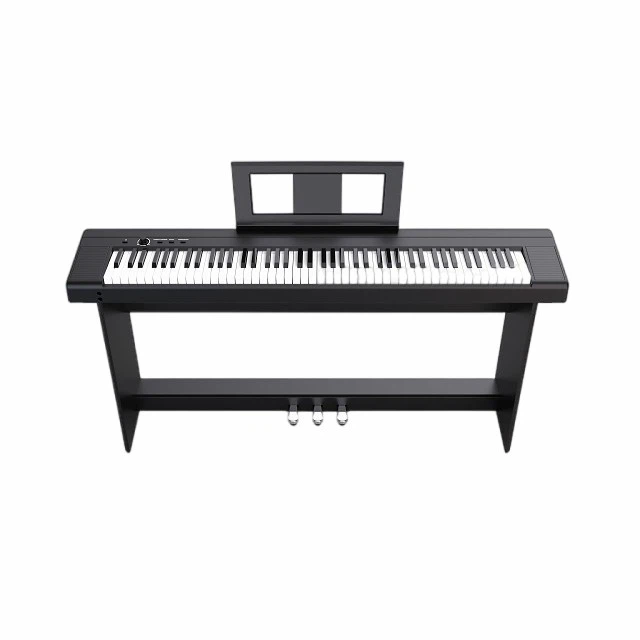
Price Tier Comparison: Understanding What You Get
Entry-Level (300-800 dollars)
Typical features: 61-76 keys, unweighted or semi-weighted action, basic piano and organ sounds, simple auto-accompaniment, minimal connectivity.
Best for: Absolute beginners, casual players, young children, budget-conscious households.
Limitations: Limited touch sensitivity, simplified sound engines, plastic construction, minimal expansion options.
Mid-Range (800-2,500 dollars)
Typical features: 88 weighted keys with hammer action, multi-layer sampling, expanded sound libraries, registration memory, USB-MIDI connectivity, quality speakers, pedal inputs.
Best for: Serious students, advancing hobbyists, home studio users, semi-professional performers.
Advantages: Realistic key feel, expressive sound response, reliable build quality, room for growth.
Professional (2,500-6,000+ dollars)
Typical features: Premium wooden-key actions, concert-grade sampling, extensive sound libraries, advanced connectivity (audio interface, WiFi), professional build quality, comprehensive performance controls.
Best for: Advanced students, performing musicians, recording artists, serious enthusiasts.
Advantages: Authentic acoustic response, studio-quality sound, road-worthy durability, maximum creative flexibility.
Expert insight: "The jump from entry to mid-range delivers the most noticeable improvement per dollar," explains Robert Chen, product manager at Beisite Corporation. "Mid-range instruments offer professional features at accessible prices. The jump from mid to professional offers diminishing returns for most players."
Key Upgrade Factors: What Actually Matters
Key Action and Touch Response
Weighted hammer-action keys simulate acoustic piano resistance, developing proper finger technique. Look for graded hammer action (heavier in low register, lighter in high) for most authentic feel.
Sound Engine Quality
Multi-layer sampling captures instruments at different velocities for realistic dynamic response. Premium sound engines include detailed articulation modeling and natural resonance simulation.
Connectivity and Expansion
USB-MIDI enables computer integration for recording and production. Audio outputs allow connection to external speakers. Expansion slots or download capability future-proof your investment.
Build Quality and Durability
Metal chassis, quality key mechanisms, and robust connectors withstand years of use. Entry-level plastic construction may suffice for light home use but fails under regular performance demands.
Performance Features
Registration memory, split/layer functions, real-time controls, and intuitive interfaces enhance live playing and creative workflow.
Expert insight: "Prioritize what you'll actually use," advises Jennifer Lee, session keyboardist in Los Angeles. "A thousand-dollar feature you never touch is worse than a hundred-dollar feature you use daily."
Decision Framework: Questions to Ask Before Upgrading
Assess Your Current Limitations
What specifically frustrates you about your current keyboard? Is it key feel, sound quality, missing features, or reliability? Identify concrete problems rather than vague dissatisfaction.
Define Your Musical Goals
Where do you want to be in one year? Three years? Your upgrade should support anticipated growth, not just current needs.
Evaluate Practice Frequency
Daily players benefit more from upgrades than occasional users. Investment should correlate with usage intensity.
Consider Your Environment
Apartment dwellers may prioritize headphone quality and compact size. Performers need portability and reliability. Producers require connectivity and sound quality.
Set a Realistic Budget
Include not just the instrument cost but necessary accessories: stand, bench, pedals, cables, case. Factor in potential trade-in value of your current keyboard.
Test Before Buying
Visit showrooms to compare key actions and sound quality personally. What feels right varies between individuals.
Expert insight: "Don't upgrade because of marketing or envy," cautions Dr. Goldman. "Upgrade because your current instrument genuinely limits your musical development. That's a decision based on growth, not consumption."
Budget Strategies: Maximizing Value in Your Upgrade
New vs. Used Considerations
Quality used instruments from reputable brands offer significant savings. Verify condition, test thoroughly, and purchase from trusted sources. Avoid instruments with unknown maintenance history.
Previous-Generation Models
Last year's flagship often provides professional features at mid-range prices. Technology advances incrementally; year-old models remain highly capable.
Trade-In Programs
Many retailers offer trade-in credit toward new purchases. Even modest credit reduces net cost and simplifies selling your current instrument.
Seasonal Sales and Financing
Black Friday, end-of-year, and summer sales offer meaningful discounts. Interest-free financing spreads cost without increasing total price.
Accessory Planning
Budget for essential accessories upfront. A professional keyboard with cheap stand and pedals undermines the upgrade benefit.
Expert insight: "Smart upgrading isn't about spending the most," explains Michael Torres. "It's about spending strategically on features that matter for your specific situation."
Real Stories: Players Who Navigated the Upgrade Journey
Daniel Kim, 29, Software Developer and Hobbyist, San Francisco
"I started with a 400-dollar keyboard. After eighteen months of daily practice, the unweighted keys felt limiting. I upgraded to a 1,500-dollar model with weighted action. The difference was immediate - my technique improved because the instrument demanded proper finger control. Worth every penny."
Linda Park, 36, Music Teacher, Seattle
"I upgraded from entry-level to mid-range when I started teaching from home. My students needed to hear realistic piano tone, and I needed registration memory for efficient lessons. The upgrade paid for itself through improved teaching effectiveness."
Carlos Rivera, 31, Weekend Performer, Barcelona
"My entry-level keyboard worked for practice but failed during my first paid gig. I upgraded to a reliable mid-range model with better speakers and connectivity. Now I perform confidently without worrying about equipment failure."
Emma Rodriguez, 43, Home Studio Producer, Madrid
"I upgraded when I realized my keyboard's MIDI implementation was limiting my production workflow. The new model's advanced connectivity transformed my creative process. Sometimes the upgrade isn't about sound - it's about capability."
Michael Chang, 38, Classical Student, Toronto
"I waited two years before upgrading from my starter keyboard. When I finally moved to a model with graded hammer action, my teacher noticed immediate improvement in my touch control. Sometimes patience leads to better decisions."
Common Upgrade Mistakes and How to Avoid Them
Mistake One: Upgrading Too Early
Buying professional gear before developing foundational skills wastes money and may overwhelm beginners with complexity.
Solution: Master your current instrument first. Upgrade when limitations become clear, not when marketing tempts you.
Mistake Two: Chasing Specs Over Experience
Focusing on feature lists rather than playability leads to instruments that look impressive but feel unsatisfying.
Solution: Test instruments personally. How it feels matters more than what the brochure says.
Mistake Three: Ignoring Total Cost of Ownership
Professional keyboards may require expensive accessories, maintenance, or insurance.
Solution: Budget for the complete ecosystem, not just the instrument price.
Mistake Four: Buying for Future Dreams Rather Than Current Reality
Purchasing gear for goals you may never pursue leads to regret and underutilization.
Solution: Upgrade for where you are and where you realistically expect to be in twelve months.
Mistake Five: Neglecting Resale Value
Some brands and models hold value better than others, affecting future upgrade flexibility.
Solution: Research resale trends if you anticipate upgrading again within a few years.
Future-Proofing: Choosing an Instrument That Grows With You
Modular Connectivity
Keyboards with standard MIDI, USB, and audio connections adapt to evolving technology. Proprietary systems may become obsolete.
Software Update Support
Manufacturers that provide firmware updates extend instrument lifespan. Research company support history before purchasing.
Expandable Sound Libraries
Instruments supporting downloadable content accommodate evolving musical interests without requiring hardware replacement.
Service and Repair Availability
Brands with accessible service networks ensure long-term maintainability. Obscure brands may leave you stranded if issues arise.
Expert insight: "Think five years ahead," advises Robert Chen of Yamaha. "The best upgrade isn't just better than what you have - it's still relevant to who you're becoming."
The Upgrade Timeline: A Practical Framework
Months 0-6: Foundation Building
Focus on consistent practice with your current instrument. Develop basic technique and musical understanding.
Months 6-12: Limitation Identification
Notice specific frustrations. Document what your current keyboard cannot do that you need it to do.
Months 12-18: Research and Testing
Explore options within your budget. Visit showrooms. Read independent reviews. Consult teachers or experienced players.
Months 18-24: Decision and Transition
Make your purchase. Allow time to learn your new instrument's features. Sell or donate your previous keyboard responsibly.
Expert insight: "Upgrading is a process, not an event," explains Dr. Emily Chen of Berklee. "Thoughtful progression yields better outcomes than impulsive purchases."
Final Thought: Your Instrument Should Inspire, Not Limit
The right keyboard at the right time transforms practice from obligation to inspiration. Upgrading isn't about consumerism - it's about removing barriers between your musical imagination and its expression.
As Marcus Webb summarizes: "Your keyboard is a partner in your musical journey. When that partnership feels limiting rather than liberating, it's time to find a better match. Invest in tools that challenge you to grow, not comfort you in stagnation."
One keyboardist's post on Piano World Forum captures the sentiment:
"I upgraded not because my old keyboard was bad, but because I had become someone it couldn't fully serve. The new instrument didn't make me a better player overnight. But it stopped holding me back. Sometimes that's the difference between plateau and progress."
📧 Reader Engagement
Are you considering a keyboard upgrade? What questions do you have about timing or selection? Share your thoughts at jjbet01@beisite-tech.com Selected stories will be featured in upcoming issues.